
Unlock Advanced OCR Capabilities with Mistral OCR & Streamlit
Transform Documents into Structured Data with AI-Powered OCR


Mistral OCR is setting a new standard in Optical Character Recognition (OCR), making it easier than ever to extract meaningful insights from complex documents. Whether you're working with PDFs, images, or multimodal documents, Mistral OCR delivers structured outputs, including interleaved text and images, mathematical expressions, and LaTeX formatting.
In this tutorial, we’ll walk you through how to build your own Mistral OCR application using Streamlit. You'll learn how to:
Upload and process documents via URL, PDF, or image files
Extract and format structured data using Mistral OCR’s API

Here is my Youtube video:

Top-Tier Benchmarks
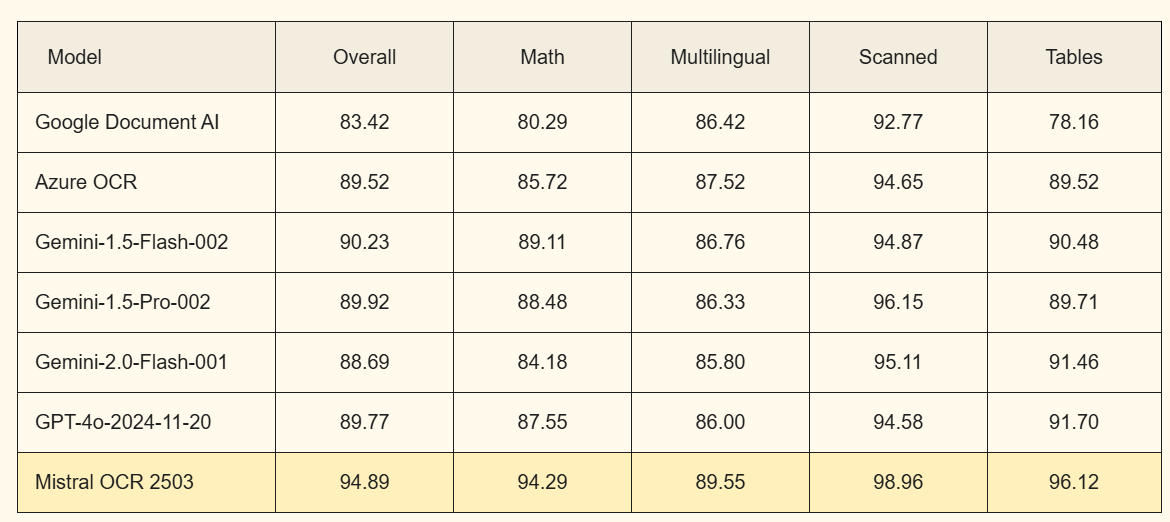
Mistral OCR stands out in rigorous benchmark evaluations, consistently surpassing other leading OCR models in accuracy and performance. Unlike many other LLMs, Mistral OCR not only extracts text but also captures embedded images within documents. To ensure a fair comparison, we assessed competing models using our internal "text-only" test set, which includes a diverse range of publication papers and web-sourced PDFs. The results highlight Mistral OCR's exceptional capability in document analysis.
How to Run the Code
Install Dependencies: Ensure you have Python installed, then run:
pip install streamlit mistralaiSet Up Your API Key: Get an API key from Mistral and input it in the Streamlit sidebar.
Run the Application:
streamlit run your_script.pyUpload Your Document: Choose a URL, PDF, or image file for processing.
Extract and Download Results: View extracted content and download it in text or Markdown format.
Full Code Implementation
import streamlit as st
import base64
import tempfile
import os
from mistralai import Mistral
from PIL import Image
import io

def upload_pdf(client, content, filename):
    with tempfile.TemporaryDirectory() as temp_dir:
        temp_path = os.path.join(temp_dir, filename)

        with open(temp_path, "wb") as tmp:
            tmp.write(content)

        try:
            with open(temp_path, "rb") as file_obj:
                file_upload = client.files.upload(
                    file={"file_name": filename, "content": file_obj},
                    purpose="ocr"
                )

            signed_url = client.files.get_signed_url(file_id=file_upload.id)
            return signed_url.url
        finally:
            if os.path.exists(temp_path):
                os.remove(temp_path)

def process_ocr(client, document_source):
    return client.ocr.process(
        model="mistral-ocr-latest",
        document=document_source,
        include_image_base64=True
    )

def display_pdf(file):
    with open(file, "rb") as f:
        base64_pdf = base64.b64encode(f.read()).decode("utf-8")
        pdf_display = f'<iframe src="data:application/pdf;base64,{base64_pdf}" width="700" height="1000" type="application/pdf"></iframe>'
        st.markdown(pdf_display, unsafe_allow_html=True)

def main():
    st.set_page_config(page_title="Mistral OCR Processor", layout="wide")
    api_key = st.sidebar.text_input("Mistral API Key", type="password")

    if not api_key:
        st.warning("Enter API key to continue")
        return

    client = Mistral(api_key=api_key)

    st.header("Mistral OCR Processor")
    input_method = st.radio("Select Input Type:", ["URL", "PDF Upload", "Image Upload"])

    document_source = None
    preview_content = None

    if input_method == "URL":
        url = st.text_input("Document URL:")
        if url:
            document_source = {"type": "document_url", "document_url": url}
    elif input_method == "PDF Upload":
        uploaded_file = st.file_uploader("Choose PDF file", type=["pdf"])
        if uploaded_file:
            content = uploaded_file.read()
            pdf_path = upload_pdf(client, content, uploaded_file.name)
            display_pdf(uploaded_file.name)
            document_source = {"type": "document_url", "document_url": pdf_path}
    elif input_method == "Image Upload":
        uploaded_image = st.file_uploader("Choose Image file", type=["png", "jpg", "jpeg"])
        if uploaded_image:
            image = Image.open(uploaded_image)
            st.image(image, caption="Uploaded Image", use_container_width=True)
            buffered = io.BytesIO()
            image.save(buffered, format="PNG")
            img_str = base64.b64encode(buffered.getvalue()).decode()
            document_source = {"type": "image_url", "image_url": f"data:image/png;base64,{img_str}"}

    if document_source and st.button("Process Document"):
        with st.spinner("Extracting content..."):
            try:
                ocr_response = process_ocr(client, document_source)
                if ocr_response and ocr_response.pages:
                    extracted_content = "\n\n".join(
                        [f"**Page {i+1}**\n{page.markdown}" for i, page in enumerate(ocr_response.pages)]
                    )
                    st.subheader("Extracted Content")
                    st.markdown(extracted_content)
                    st.download_button("Download as Text", extracted_content, "extracted_content.txt", "text/plain")
                    st.download_button("Download as Markdown", extracted_content, "extracted_content.md", "text/markdown")
                else:
                    st.warning("No content extracted.")
            except Exception as e:
                st.error(f"Processing error: {str(e)}")

if __name__ == "__main__":
    main()
Leverage the power of AI-driven OCR today and streamline your document processing workflows. Try it out now!